Author and publish
Extended Markdown
Lisible supports standard Markdown, GFM and several extensions designed for technical writing. Every example below first shows the code to write, followed by its actual rendering. Behavior matches across all six variants even when their styling changes. For real interactions, continue with MDX components.
Headings and paragraphs
Use a single level-one title in frontmatter through title. Start the article body at ## for main sections, then move down without skipping a level. Level-two through level-four headings automatically receive a copyable anchor.
Code
#### An example heading
A paragraph remains one sequence of lines without a blank line.A blank line starts a new paragraph.Rendered output
An example heading
A paragraph remains one sequence of lines without a blank line. A blank line starts a new paragraph.
Inline formatting
Use emphasis to structure a sentence, not as a replacement for headings. GFM adds strikethrough text. Inline code suits short commands, filenames and identifiers. The HTML mark and kbd elements are accepted in MDX for highlighting and keyboard keys.
Code
Text can be **important**, *nuanced*, ~~obsolete~~ or contain `const value = 1`.
Press <kbd>Ctrl</kbd> + <kbd>K</kbd> to open <mark>search</mark>.Rendered output
Text can be important, nuanced, obsolete or contain const value = 1.
Press Ctrl + K to open search.
Links
Link text should describe its destination. Use a route starting with / for an internal page and an absolute URL for an external website. An optional title can add hover context but does not replace descriptive link text.
Code
Read the [content model](/en/docs/authoring/content/) or the [Astro documentation](https://docs.astro.build/ "Official Astro documentation").Rendered output
Read the content model or the Astro documentation.
Images
Put shared files in public/images, then reference them from the site root. Alternative text describes the information carried by the image; leave it empty only for a strictly decorative image. The quoted title is optional.
Dimensions are not your responsibility: at build time Lisible reads the intrinsic size of every local image (SVG, PNG, JPEG, GIF) and sets width, height, loading="lazy" and decoding="async" on the emitted tag. Space is reserved before the image loads, so it never shifts the layout.
Code
Rendered output

Lists
Markdown supports unordered, ordered and nested lists. GFM adds tasks through - [ ] and - [x]; rendered checkboxes are informational and do not modify the source file.
Code
- Write the draft - Add examples- Review the content
1. Build the site2. Check the links
- [x] Documentation written- [ ] Review completeRendered output
- Write the draft
- Add examples
- Review the content
- Build the site
- Check the links
- Documentation written
- Review complete
Blockquotes
Prefix every quoted paragraph with >. A nested quote uses >>. Add the source in the prose or through a link: Markdown cannot infer it.
Code
> Performance is an editorial feature.>> Lisible teamRendered output
Performance is an editorial feature.
Lisible team
Tables
The second line defines each column’s alignment: :--- for left, :---: for center and ---: for right. Wide tables become horizontally scrollable on small screens.
Code
| Variant | Use | Posts || :--- | :---: | ---: || Organique | Editorial | 12 || Terminal | Technical | 8 |Rendered output
| Variant | Use | Posts |
|---|---|---|
| Organique | Editorial | 12 |
| Terminal | Technical | 8 |
Footnotes
A [^id] reference points to a definition with the same identifier. Definitions can stay near their source paragraph; the renderer gathers them at the end of the page and adds return links automatically.
Code
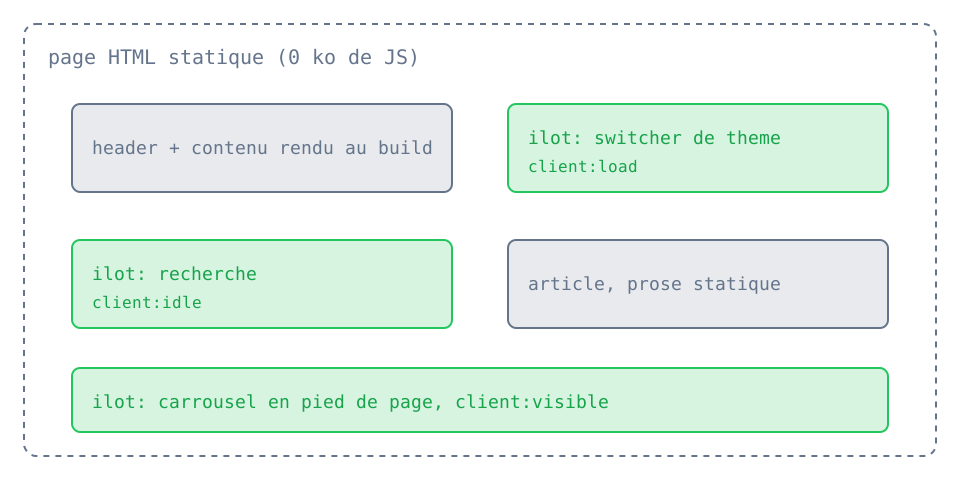
Islands reduce the JavaScript sent to the browser.[^islands]
[^islands]: Astro hydrates only components marked with a client directive.Rendered output
Islands reduce the JavaScript sent to the browser.1
Collapsible details
The native HTML details element hides non-essential supporting content. Its summary should clearly announce what will be revealed. Add open to display the content on initial load.
Code
<details> <summary>Show the complete command</summary>
Run `bun run check:all` before deployment.</details>Rendered output
Show the complete command
Run bun run check:all before deployment.
Horizontal rule
Three hyphens on their own line create a thematic break. Reserve it for significant topic changes; headings are sufficient in most sections.
Code
End of the first part.
---
Start of the next part.Rendered output
End of the first part.
Start of the next part.
Callouts
A callout highlights information that deserves a specific level of attention. Available variants are note, tip, important, warning and caution. Text in brackets replaces the translated default title.
| Variant | Recommended use |
|---|---|
note | useful context or clarification |
tip | optional advice that makes a task easier |
important | information required for success |
warning | recoverable risk or unexpected behavior |
caution | data loss, security or hard-to-reverse action |
Code
:::note[Context]Drafts remain visible during development.:::
:::tip[Save time]Run checks before pushing.:::
:::important[Required configuration]Set the public URL before building.:::
:::warning[Before deploying]Check internal links.:::
:::caution[Destructive action]Back up data before a migration.:::Rendered output
Collapsible callout
Add the {collapse} attribute after the title to turn the callout into a native collapsible region. Its content remains in the page and must therefore never contain a secret.
Code
:::note[Optional details]{collapse}This explanation can be opened on demand.:::Rendered output
Optional details
This explanation can be opened on demand.
Expressive Code blocks
Expressive Code provides Shiki highlighting, copy controls, a language badge, file and terminal frames, line numbers, word wrapping, text and line markers, and collapsible code sections. Always place the language immediately after the opening three backticks.
| Metadata | Effect |
|---|---|
title="src/file.ts" | displays a file tab or terminal title |
frame="code" / "terminal" / "none" / "auto" | forces or disables the frame |
showLineNumbers=false | hides numbers, which are already hidden by default in terminals |
startLineNumber=40 | starts visual numbering at 40 |
wrap=true | wraps long lines instead of adding horizontal scrolling |
preserveIndent=false and hangingIndent=2 | control indentation of wrapped lines |
{2,5-7} or mark={2,5-7} | highlights multiple lines and ranges without change semantics |
ins={3-4} / del={8} | marks inserted or deleted lines |
collapse={1-4,10-12} | hides one or more ranges until they are expanded |
Lines, ranges and labels
A block can combine neutral highlights, additions and deletions. Selectors accept one line, comma-separated lines and inclusive ranges. Text before : adds a visible label.
Code
```ts title="src/users.ts" {2,8-9} ins={"Added":4-5} del={"Removed":7}interface User { id: string; name: string; plan: "free" | "pro"; lastLogin: Date;}const legacyUser = loadLegacyUser();export function displayName(user: User) { return user.name.trim();}```Rendered output
interface User { id: string; name: string; plan: "free" | "pro"; lastLogin: Date;}const legacyUser = loadLegacyUser();export function displayName(user: User) { return user.name.trim();}Inline markers
A quoted string highlights all its occurrences. Prefix it with ins= or del= to give it inserted or deleted meaning. A /.../ expression accepts regular expressions; when it contains a capture group, only the captured part is marked.
Code
```ts "user.name" ins="cache.get" del="legacyToken" /user(Id|Name)/const userId = request.params.id;const legacyToken = request.headers.token;const cached = cache.get(userId);return user.name ?? cached;```Rendered output
const userId = request.params.id;const legacyToken = request.headers.token;const cached = cache.get(userId);return user.name ?? cached;Diff with language highlighting
The diff language interprets + and - as additions and deletions. Add lang="ts" to keep TypeScript highlighting; alignment whitespace before unchanged lines is removed in the rendered block.
Code
```diff lang="ts" title="src/config.ts" export const config = {- locale: "fr",+ locale: "en", trailingSlash: true, };```Rendered output
export const config = { locale: "fr", locale: "en", trailingSlash: true,};Collapsible code sections
collapse accepts multiple ranges. The project uses collapseStyle=collapsible-auto by default: the summary remains available after expansion and is placed on the most logical side of the range. Other values are github (one-way expansion), collapsible-start (summary first) and collapsible-end (summary last). Add collapsePreserveIndent=false to align the summary to the left.
Code
```ts title="src/server.ts" collapse={1-4,8-10} collapseStyle=collapsible-autoimport { logger } from "./logger";import { metrics } from "./metrics";const app = createApp();app.use(logger, metrics);app.get("/health", () => { return new Response("ok");});app.listen(4321);console.log("ready");process.on("SIGTERM", shutdown);```Rendered output
4 collapsed lines
import { logger } from "./logger";import { metrics } from "./metrics";const app = createApp();app.use(logger, metrics);app.get("/health", () => { return new Response("ok");});3 collapsed lines
app.listen(4321);console.log("ready");process.on("SIGTERM", shutdown);Frames, numbering and wrapping
title automatically creates an editor frame for a file. Shell languages use a terminal; frame="none" suits isolated commands. startLineNumber changes displayed numbers only: markers still count from the first source line.
Code
```ts title="src/config.ts" startLineNumber=40 wrap=true preserveIndent=true hangingIndent=2 {2}export const description = "A deliberately long line that preserves its indentation when it wraps inside a narrow content column.";```
```bash frame="none" showLineNumbers=falsebun run check:all```Rendered output
export const description = "A deliberately long line that preserves its indentation when it wraps inside a narrow content column.";bun run check:allReferences: text and line markers, frames, line numbers, word wrap and collapsible sections.
Mathematics
KaTeX renders LaTeX expressions. A formula between two $ delimiters stays inline; a block wrapped in $$ is centered and separated from the paragraph. Use LaTeX commands supported by KaTeX.
Code
The relation $E = mc^2$ is rendered inside the sentence.
$$L = -\sum_{i=1}^{n} y_i \log(\hat{y}_i)$$Rendered output
The relation is rendered inside the sentence.
Mermaid
A mermaid fence becomes an interactive diagram. Its toolbar provides zoom, pan, reset, source copy and full-screen controls; colors synchronize with the light or dark theme. Full screen uses the browser API when available and a viewport overlay fallback otherwise. Exit with the toolbar button or Escape. The content itself follows Mermaid syntax.
Code
```mermaidflowchart TD MD[Markdown] --> R[remark] R --> H[rehype] H --> HTML[Static HTML] HTML --> M[Interactive Mermaid]```Rendered output
flowchart TD MD[Markdown] --> R[remark] R --> H[rehype] H --> HTML[Static HTML] HTML --> M[Interactive Mermaid]
Footnotes
-
Astro hydrates only components marked with a client directive. ↩